
The Kit in Claude Code
The kit's rigor ships as Agent Skills, a format Claude Code reads natively. Copy the skills in, run the framework, and use the CLI for the deterministic operations so the math stays exact.
The rigor, as portable skills
The methodology is authored as Agent Skills, plain Markdown that Claude Code reads natively. Copy the skill folders into your skills directory and they appear in your agent.
Install the skills
npm pack @hobocode/thought-layer
tar -xzf hobocode-thought-layer-*.tgz
cp -r package/skills/* ~/.claude/skills/
Developing on the kit?
Symlink the skill folders instead of copying them, so local edits are live in your agent. Copying is the right call for a plain install.
What works here, and what is Pi only
The skills run anywhere that reads the format, including Claude Code. The deterministic tools are registered by the Pi extension, so in Claude Code you reach the same exact scoring, projection, scaffold, and deploy through the tl CLI instead. The math stays exact, never hand scored.
| Capability | Claude Code | Pi |
|---|---|---|
| The 12 skills (framework, panel, grill, prd, build, deploy, and more) | Native | Native |
| Exact scoring and projection (tl_score, tl_project) | Via the CLI | Native tool |
| The portable state file (tl_state) | Via the CLI (tl) | Native tool |
| Scaffold and deploy (tl_scaffold, deploy) | Via the CLI (tl scaffold, tl deploy) | Native tool |
| Sync sessions to a private repo (tl_sync) | Via the CLI (tl sync) | Native tool |
The CLI works in any shell
The tl CLI is the portable floor for the deterministic operations and the state file. No install needed; npx fetches the published package.
npx -y @hobocode/thought-layer tl read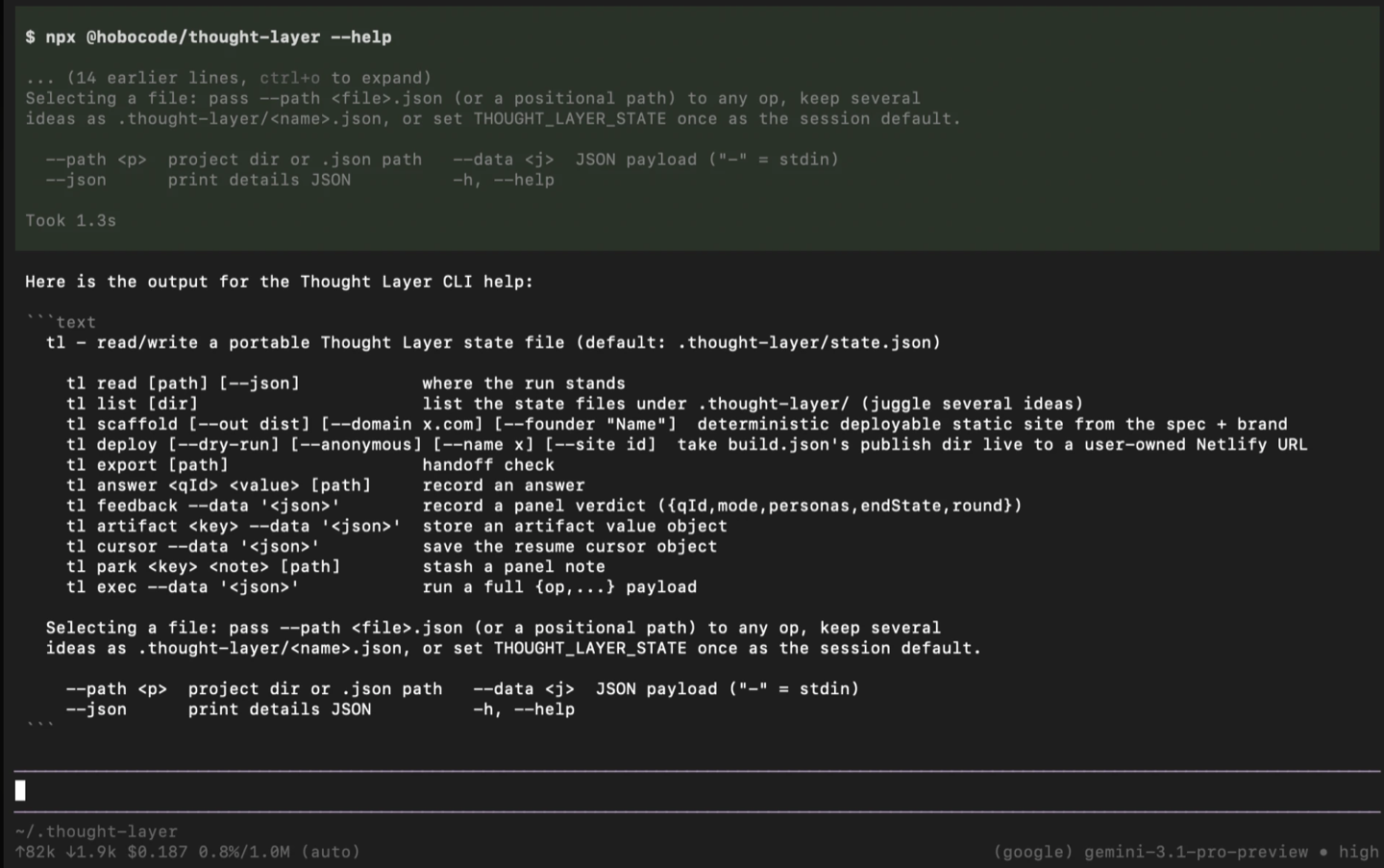
npx -y @hobocode/thought-layer tl --help lists every command.Commands
| Command | What it does |
|---|---|
| tl read [path] | Where the run stands. Add --json for the full details. |
| tl list [dir] | List the state files under .thought-layer/ when you juggle several ideas. |
| tl answer <qId> <value> | Record an answer against a question id. |
| tl feedback --data '<json>' | Record a panel verdict. |
| tl artifact <key> --data '<json>' | Store an artifact (prd, grill, bizModel, naming, brand, and so on). |
| tl cursor --data '<json>' | Save the resume position. |
| tl park <key> <note> | Stash a panel note with no web app question. |
| tl scaffold [--domain x.com] [--founder "Name"] | Write a deployable branded static site from the spec and brand. |
| tl deploy [--dry-run] [--anonymous] [--site id] | Take build.json's publish directory live to a user-owned URL. |
| tl sync <init|save|list|open|pull|push|status> | Store and version your sessions in your own private GitHub repo over git. No token paste. |
| tl export [path] | Report the current file for a handoff. |
Scaffold and deploy
From a state file with a spec and brand, scaffold an instant site, preview the deploy plan, then go live.
npx -y @hobocode/thought-layer tl scaffold --domain https://acme.com
npx -y @hobocode/thought-layer tl deploy --dry-run
npx -y @hobocode/thought-layer tl deploy
Sync sessions across machines and collaborators
Keep your sessions in your own private GitHub repo so you can move between machines and work with others. The kit syncs over git, using your gh login or git credential helper, so no token is pasted into the CLI.
tl sync init --repo your-name/tl-sessions   # gh creates the private repo if needed
tl sync save --name photobooth              # snapshot the session, commit, push
tl sync open --name photobooth              # pull and resume a session

# or with no install:
npx -y @hobocode/thought-layer tl sync list
No token paste
Auth uses your existing gh login or git credential helper, so you never type a token into the CLI. With gh logged in, tl sync init creates the private repo for you; without gh, create it on GitHub first. To collaborate, add people in the repo's GitHub settings. See Collaboration.
Environment variables
| Variable | Used for |
|---|---|
| THOUGHT_LAYER_STATE | The default state file path for a session. |
| THOUGHT_LAYER_DOMAIN_KEY (or RAPIDAPI_KEY) | Your RapidAPI key for live domain checks. |
| NETLIFY_AUTH_TOKEN | Your Netlify token for tl deploy. Read from the environment only. |
Lossless handoff
The state file is the same one the web app and Pi use, so you can pass work between the browser, Claude Code, and Pi without losing anything.