
The Kit in Pi
Pi is the flagship host for the kit. Install the package, run the framework with /tl, and let the deterministic tools keep the scoring and the math exact while the agent does the thinking.
What Pi is
Pi (@earendil-works/pi-coding-agent, by Mario Zechner) is a minimal, MIT, bring your own key coding agent. You extend it with skills, prompt templates, and TypeScript tools, distributed over plain npm or git. Its ethos, a minimal core extended by packages with no SaaS and no lock-in, mirrors the kit's, which is why it is the flagship host.
Pi
Learn about Pi at pi.dev. The kit is published on npm as @hobocode/thought-layer.
Install
pi install npm:@hobocode/thought-layerInstalling the package lights up the skills, the /tl commands, and the tl_score, tl_domains, tl_project, tl_state, tl_scaffold, and deploy tools. You can also invoke a skill directly, for example /skill:thought-layer-panel.
Two gotchas worth knowing
Pi does not hot reload. pi update syncs files to disk, but a running session keeps the registry it built at startup, so restart Pi after installing or editing a skill. And never install the same package from both npm: and git: at once, because both register the tools and they collide.
Run the framework with /tl
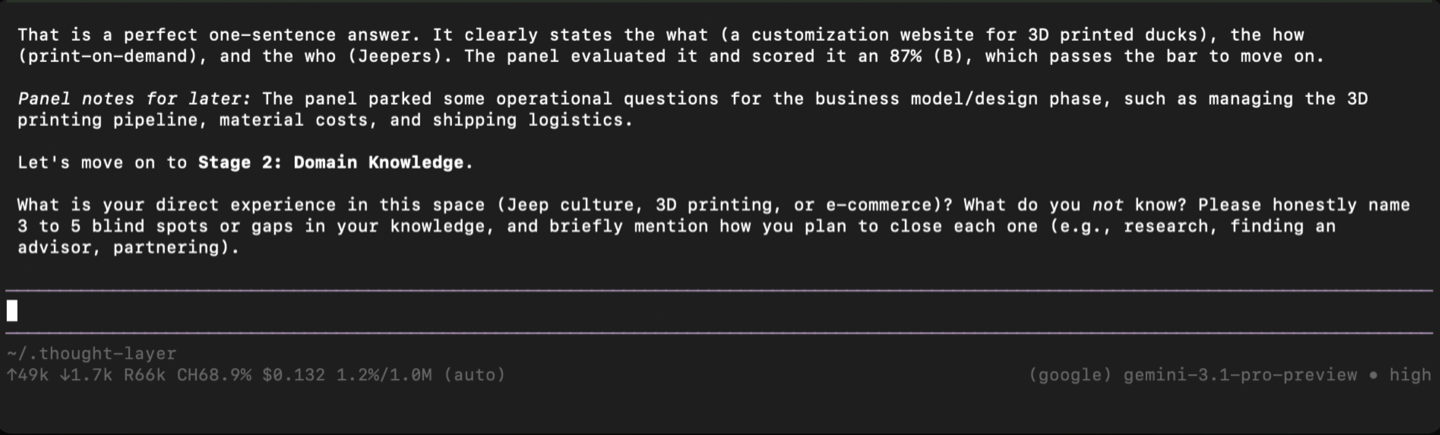
/tl walks the whole framework in order and does not skip ahead. It asks for your idea, then moves through validate, model, and design last. It advances exactly one stage per turn and stops for you.

One stage at a time
Each stage is judged by an adversarial panel (a red team, a domain expert, and a skeptical investor) at that stage's altitude. You get a confidence score, a letter grade, and at most three fixes that belong to this stage. A stage clears at 0.85 confidence, or when you set it aside, in which case the open items carry forward as to-dos.
The deterministic tools
The kit registers real tools so the agent never re-derives the math. This is where the consistency lives.
| Tool | What it does |
|---|---|
| tl_score | Aggregate one or more confidence values into a stoplight status and a letter grade. |
| tl_domains | Check domain availability across common TLDs, reading a RapidAPI key from the environment. |
| tl_project | Run the monthly projection: break-even, year-one revenue and net, max cash drawdown, ending MRR. |
| tl_state | Read and update the portable progress file (the same file the web app uses). |
| tl_scaffold | Write a branded, SEO-complete static site as an instantly deployable floor. |
| deploy | Take the publish directory live to a user-owned Netlify URL. |
| tl_sync | Store and version your session files in your own private GitHub repo over git. BYOK, no token paste. |
Build and deploy, in the same agent
After the grill hardens the PRD, the build and deploy steps close the loop without leaving Pi.
- Build with
/tl-build: the agent builds the spec static-first into a predictabledist/, honoring the glossary, requirement traceability, the out-of-scope list, mobile and desktop, brand, and the full SEO layer. A three question test gates any backend and flags it loudly. - Scaffold with
tl_scaffoldfor the fastest deployable floor: a branded, SEO-complete landing site, with no model call. - Deploy with the
deploytool: with a Netlify token it deploys into your own account via the file-digest API (owned immediately); with no token it uses the Netlify CLI, creating a site in your account when logged in, or an anonymous, claimable URL when logged out.
Sync and collaborate
Keep your sessions in your own private GitHub repo so you can move between machines and collaborate with others. The kit syncs over git, and no token is pasted into the CLI (it uses your gh login or your git credential helper). Each session is one file in the repo.
tl sync init --repo your-name/tl-sessions   # gh creates the private repo if needed
tl sync save --name photobooth              # snapshot the session, commit, push
tl sync list                                # the sessions in the repo
tl sync open --name photobooth              # pull and resume a session

# or with no install, via npx:
npx -y @hobocode/thought-layer tl sync save --name photobooth
No token paste
Auth uses your existing gh login or git credential helper, so you never type a token into the CLI. With gh installed and logged in, tl sync init creates the private repo for you; without gh, create the repo on GitHub first. To collaborate, add people in the repo's GitHub settings and they sync the same way. See Collaboration.
Reference
Slash commands
| Command | Purpose |
|---|---|
| /tl | Run the full framework, one stage at a time. |
| /tl-speedrun | The fast, unranked path to a build-ready spec. |
| /tl-panel | Pressure test one stage answer with the panel. |
| /tl-prd | Draft the PRD from the validated idea and business model. |
| /tl-grill | Grill the draft PRD and harden it inline. |
| /tl-naming | Propose names with rationale and domain-ready slugs. |
| /tl-build | Build the hardened PRD into a deploy-ready artifact. |
| /tl-deploy | Take the build live to a URL you own. |
Environment variables
| Variable | Used for |
|---|---|
| THOUGHT_LAYER_STATE | The default state file path, so you can keep several ideas as separate files. |
| THOUGHT_LAYER_DOMAIN_KEY (or RAPIDAPI_KEY) | Your RapidAPI key for live domain checks. With no key, naming links to a search instead. |
| NETLIFY_AUTH_TOKEN | Your Netlify token for the deploy tool. Read from the environment only, never a parameter. |